


Table of Contents
An office admin is routing a customer call while connectivity tickets stack up. The phone system is slow, the payment portal won’t load, and the person who approved the last network invoice is in meetings until noon.
Dan Nedoborski, CEO at NetAccess Systems, notes: “The practical question isn’t who can fix the server, it’s who is watching the workflow before staff, customers, and invoices are already affected.”
That’s where break fix vs managed services becomes more than an IT preference. It affects support schedules, staff handoffs, approvals, invoices, and the downtime risk your team carries into the day.
At NetAccess Systems, we look at IT through the operating rhythm of the business, so technology supports the work instead of pulling people away from it.
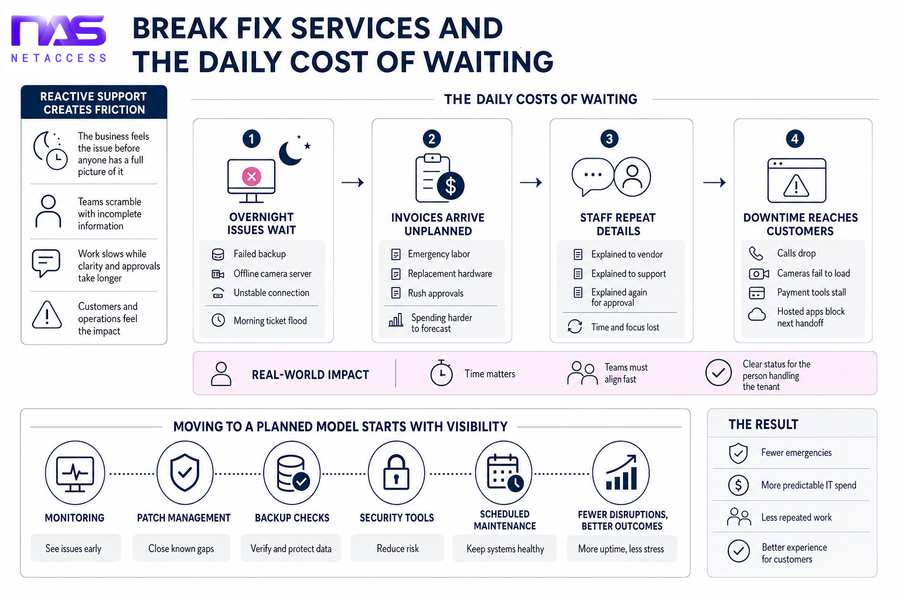
Break Fix Services And The Daily Cost Of Waiting
Reactive support creates friction because the business feels the issue before anyone has a full picture.
-
Overnight issues wait: Without after-hours monitoring, a failed backup, offline camera server, or unstable connection becomes a morning ticket flood.
-
Invoices arrive unplanned: Emergency labor, replacement hardware, and rush approvals make IT spending harder to forecast. The broader cost of technology disruption is real, with 63% of organizations saying they would increase the cost of goods or services because of a breach.
-
Staff repeat details: A manager explains the same access issue to one vendor, then support, then the person approving the fix.
-
Downtime reaches customers: Calls drop, cameras fail to load, payment tools stall, or a hosted application blocks the next handoff.
A property manager discovering camera access is down during a tenant issue doesn’t need three disconnected conversations. Connectivity, hosting, and support teams need to align quickly, with clear updates for the person handling the tenant. Time matters.
Moving to a planned model starts with visibility. Monitoring, patch management, backup checks, security tools, and scheduled maintenance help teams reduce disruption and spend IT dollars more deliberately.
Break Fix Vs Managed Services For Operational Maturity
Coordinating uptime across staff, vendors, carrier tickets, hosted applications, and existing systems is hard enough without chasing every issue from scratch. This decision shapes budgeting, documentation, risk, and service continuity.
-
Monitoring before staff notice
With 24/7 monitoring, alerts surface before users arrive to a locked file share or offline application. That reduces surprise outages and duplicate tickets. -
Maintenance outside busy hours
Patch management, endpoint protection, and desktop optimization work best when scheduled around operating hours. Staff keep access to files, applications, and customer records with fewer midday interruptions. -
Budgets with fewer surprises
Predictable IT costs come from lifecycle planning, purchasing support, and regular reviews of unnecessary spend. We tie those choices to business priorities, not a generic equipment list. -
Support that fits workflows
Good support respects existing approval paths, onsite staff, and current systems. Handoffs improve when tickets, vendors, and internal decision makers work from the same context. -
Leadership without full-time overhead
A Technology Alignment Manager and VCIO help set priorities, plan projects, and guide decisions. That’s The NetAccess Way in practice: Reliable. Innovative. Personal.
Managed Services Over Break Fix Support For Existing Teams
Changing support models is hard when everyone is already busy. Staff get used to calling only after something breaks, even when that habit leaves them explaining the same issue during a customer deadline or invoice run.
Managed services should integrate with existing staff and vendors, not replace every workflow. Relying only on break fix services leaves teams reacting after users are already affected, which makes handoffs, approvals, and customer updates harder.
-
Shared ticket visibility: Staff see status, next steps, and ownership without repeating the same printer, login, or file-access details.
-
Aligned maintenance windows: Scheduled work can be planned around operating hours, approvals, and customer-facing systems such as phones, payment tools, and portals.
-
Private infrastructure support: Hosting, backup monitoring, recovery testing, and uptime planning help keep critical systems ready. The NIST contingency planning guide is a useful reference for why recovery planning belongs in normal operations.
-
Carrier-aware communications: Coverage across major carriers, cloud backup, clear calling, and 24/7 monitoring support the phone and connectivity systems people use all day.
Once the support model fits the team, the next step is a practical assessment of systems, tickets, approvals, and costs.
Explore Smarter IT Service Models
-
What Are Managed IT Services? A Practical Guide For Growing Teams
-
Why Managed Services Matter When Downtime, Costs, And IT Ownership Keep Slipping
-
How To Choose Managed Services Provider: Questions That Prevent IT Surprises
-
Managed Services Vs Professional Services: How To Choose The Right IT Ownership Model
-
IT Managed Services Challenges That Disrupt Work, Costs, And IT Decisions
Managed Service Planning Replaces Break-Fix Fire Drills
Moving away from reactive IT takes planning, documentation, and internal agreement. The work is manageable when it follows the same path your team already uses for approvals, invoices, staff access, and customer-impacting changes.
-
Inventory critical systems: List communication tools, hosted applications, cameras, backups, network equipment, workstations, and security tools so support priorities match daily operations.
-
Review recurring tickets: Sort issues by location, device, vendor, time of day, and business impact. Patterns show where maintenance or replacement planning will help most.
-
Map approval workflows: Document who approves purchases, maintenance windows, emergency work, and user access changes, including who steps in when the usual approver is unavailable.
-
Check backup routines: Confirm monitoring, recovery testing, and alert recipients. The CISA guidance on backups is a practical reminder that recovery needs ownership, not just storage.
-
Build the budget conversation: Include lifecycle planning, performance reviews, technology purchasing support, unnecessary spend review, and business priorities for the next planning cycle.
NetAccess Systems often works alongside onsite IT staff and leadership to make these steps practical, using clear processes that support predictable costs, cleaner approvals, and better continuity.
Move Beyond IT Fire Drills
See how NetAccess Systems can help replace reactive break fix support with managed services built around your daily workflows.
Managed Services And Break Fix Decisions With NetAccess Systems
When someone starts the morning checking camera access, reopening a connectivity ticket, or chasing an invoice tied to last month’s outage, the right IT model should make the next step clear. The model should improve uptime, support coordination, budget planning, communication reliability, and security maintenance for software supply chain risks, including the OWASP finding that 91% of codebases contain components with no new development in more than two years.
NetAccess Systems uses private infrastructure and a consultative approach to support reliable, practical IT environments built around how your business runs, and it reviews unnecessary IT spending so decisions stay aligned with business objectives. If recurring issues, unclear ownership, or unpredictable invoices are getting in the way, contact NetAccess Systems for a practical conversation about your current environment, support model, and cost predictability.